This is the second update of this article. Just like any other major email provider, the email interface keeps changing. Also, the password reset or recover procedure also changes. Well, if somehow you lost access to your Hotmail email, you can attempt to recover your password. There are no guarantees that you will be able to access your account and it might look a little different, it all depends on your security settings. It all starts with this message: "That password is incorrect. Be sure you're using the password for your Microsoft account".
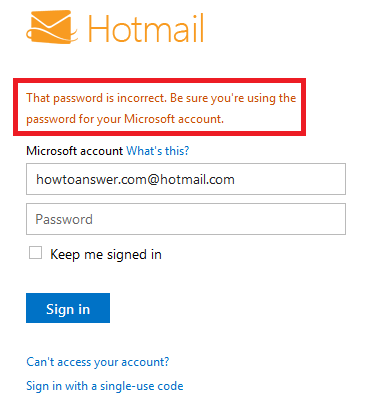
If you're sure that you typed your password correctly and still, it doesn't work, look for a small, blue link named "Can't access your account?". It's just under the "Sign In" button.

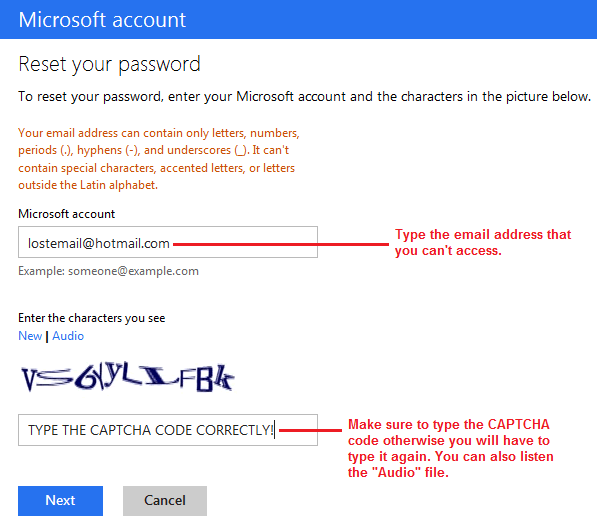
You should be taken to "Reset your password" section. As you can see in the following image, you are required to type your email address and also the captcha code. If the captcha code doesn't work, you can try another one or you could listen the audio file - it's the same thing.
Important: As I said at the beginning of this article, it all depends on current security settings of each account. I've encountered three different scenarios. Two of them are almost the same while the third is a little different.
First scenario
1. When you attempt to reset your password, Hotmail will require a secret question that should be known by you when you created your email for the first time: see the following image.

Second scenario
2. My email account was created in 2011 so I added two different email addresses that I own - at different email providers. Therefore, in order to reset my password, Hotmail will send me an email with further instructions on my other emails that I specified when I created my account.
Third scenario
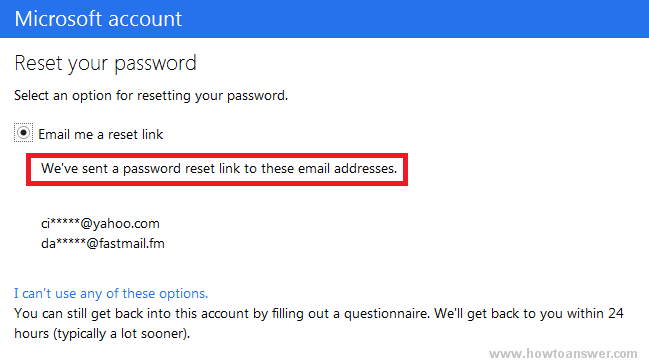
3. Take a look at the following image at "I can't use any of these options". If you click on that link, it will ask you for more details and you will have to specify an email address that you can access if you wish to receive an answer. I did not cover this part as most people won't need it but keep in mind that there are no guarantees that you will be able to recover your email. However, it worth to try, if you can offer enough details maybe the Hotmail (Microsoft) team will be able to help you.

Back to the second scenario, here's how it worked for me. I used "Email me the reset link" and this is the same window - the confirmation message is a little different. They inform me that a link to reset my password was sent on my email address (I had two, you might have only one).
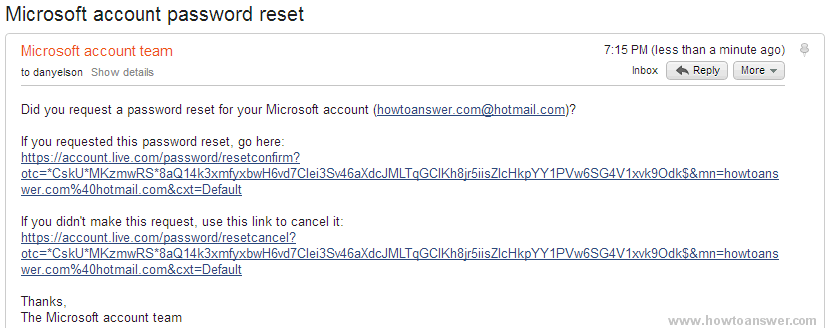
Please note that when I followed these instructions for the first time, nothing happened. I checked my Inbox and also Spam folder and the message that allowed me to reset my password didn't arrived. I waited for a couple of minutes and I started over. The second attempt was a successful one, I received two emails instead of one, both of them with the same content. Here is the content of this email received in my Yahoo email, both text and picture:
Did you request a password reset for your Windows Live account (example @ hotmail.com)?
If you requested this password reset, go here:
If you requested this password reset, go here:
https://account.live.com/password/resetconfirm?otc=*CiE2SYI ( This url has been shortened )
If you didn't make this request, use this link to cancel it:
https://account.live.com/password/resetcancel?otc=*CiE2SYIy*aKEQ ( I also shortened this URL too )
Thanks,
The Microsoft account team
The Microsoft account team
After I clicked on the link to reset my (Hotmail) Microsoft account password I was automatically redirected to this page which tells me to enter a new password twice. I entered my new password and clicked on the "Next" button.

After I did this, I was redirected to login page where I had to enter my email address again along with my new password.

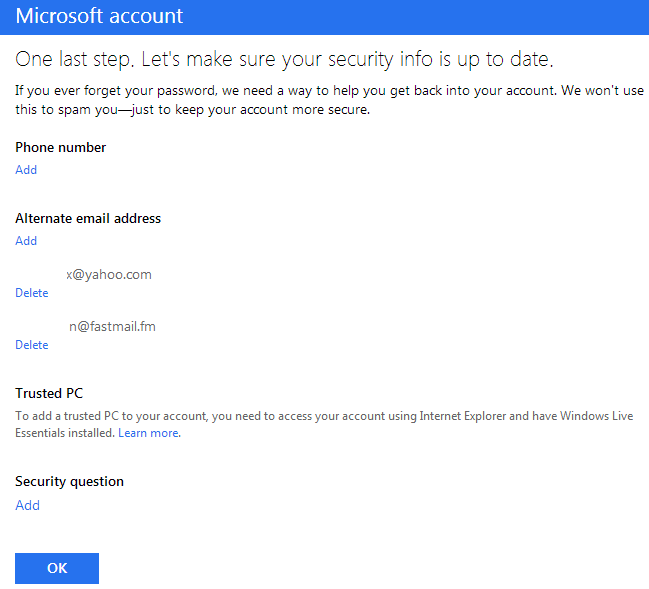
After this step, Microsoft wants to make sure that you won't forget your security info. It's just a reminder of your current security settings so make sure that you review this information again. It will be easier for you to reset your password in the future.
Tip: You can also add other safety features such as a secret question (I don't have one).
"If you ever forget your password, we need a way to help you get back into your account. We won't use this to spam you—just to keep your account more secure."
Review all the information and when ready click on "OK" to continue.
This is the final step, you will be taken to "Account Summary" section. From here you can edit your name, rename your account, edit personal info, change your password and security info and much more. You may close this window and login to your email.

One last thing, just in case you wonder why I wrote a similar article with the one named How to change Hotmail password in Windows Live, I want you to know that this is a different story. You can change your password when you can access your account but this is not the case here. Here, we are talking about how to recover your Hotmail - Live password (Microsoft), although the technical term here is called "reset" this is a simple recovery process via another email that you own or using a different method such as the security question.
